
Automated Workflows

Let the Repeatable Work Run Itself.

You already know what should happen when a lead comes in, when someone books, when a job finishes. Decide it once, and it happens every time after that, whether anyone remembers or not.

Questions first? Send us a message and we will reply the same business day.

  • No coding, no flowchart software
  • Start with one, add more later
  • You can switch any of it off
I Ninja LLC automated workflow running in the background while a business team works by Ian Lacovara

What a Workflow Actually Is

Strip away the jargon and a workflow is one sentence: when this happens, do that. When a lead comes in, send a reply. When someone books, send a confirmation. That is the whole idea.

Your business already runs on dozens of these. The only difference is that right now a person has to remember each one, and people forget on busy days. Writing them down as workflows means they happen on the busy days too.

Real Examples

Six Workflows Most Businesses Should Have

These are not clever. They are obvious, which is exactly why they are worth automating.

When

A new lead arrives

Then
  • Send a reply within seconds, day or night
  • Create the contact record so nothing is lost
  • Notify whoever owns new inquiries
When

Someone books an appointment

Then
  • Send a confirmation with the time and details
  • Add it to the calendar and block the slot
  • Stop any follow-up that was still chasing them
When

An appointment is coming up

Then
  • Send a reminder on the schedule you picked
  • Include anything they need to have ready
  • Give them a one-tap way to reschedule
When

Someone misses an appointment

Then
  • Start a friendly follow-up, not a scolding
  • Offer to rebook in one reply
  • Free the slot so someone else can take it
When

A job or service is finished

Then
  • Ask for a review while it is still fresh
  • Send the invoice or payment link
  • Schedule a check-in further down the road
When

An old lead goes quiet

Then
  • Start a reactivation message on a slow pace
  • Put anyone who replies back in the pipeline
  • Stop for good if they opt out

None of It Takes Long. That Is the Problem.

Every one of these takes two minutes. That is why nobody ever fixes them, and why they quietly eat a day a week.

Typing out the same first reply to a new inquiry 2 minutes, several times a day
Sending a confirmation after someone books 2 minutes, every booking
Remembering to send tomorrow's reminders 10 minutes, every evening
Chasing the person who did not show up 5 minutes, plus the awkwardness
Asking a happy customer for a review 3 minutes, usually skipped
Copying details from one tool into another 2 minutes, constantly

Add up your own version of this list. The total is usually the reason you never get to the work that actually grows the business.

Setup

We Build Them. You Do Not Touch a Flowchart.

Plenty of software will hand you a blank canvas and wish you luck. That is not what this is.

We watch how you work now

What happens today when a lead comes in, when a job finishes, when someone goes quiet. Including the steps you do without thinking.

We pick one that is costing you

Not all of them at once. One workflow that gives back real time or stops a real leak, built and running before we add another.

You approve every message

Nothing goes out in your name that you have not read. If a line sounds wrong, it gets changed before anyone receives it.

We watch it run, then add the next

Once it is working quietly in the background, we look at what else is eating your week and do it again.

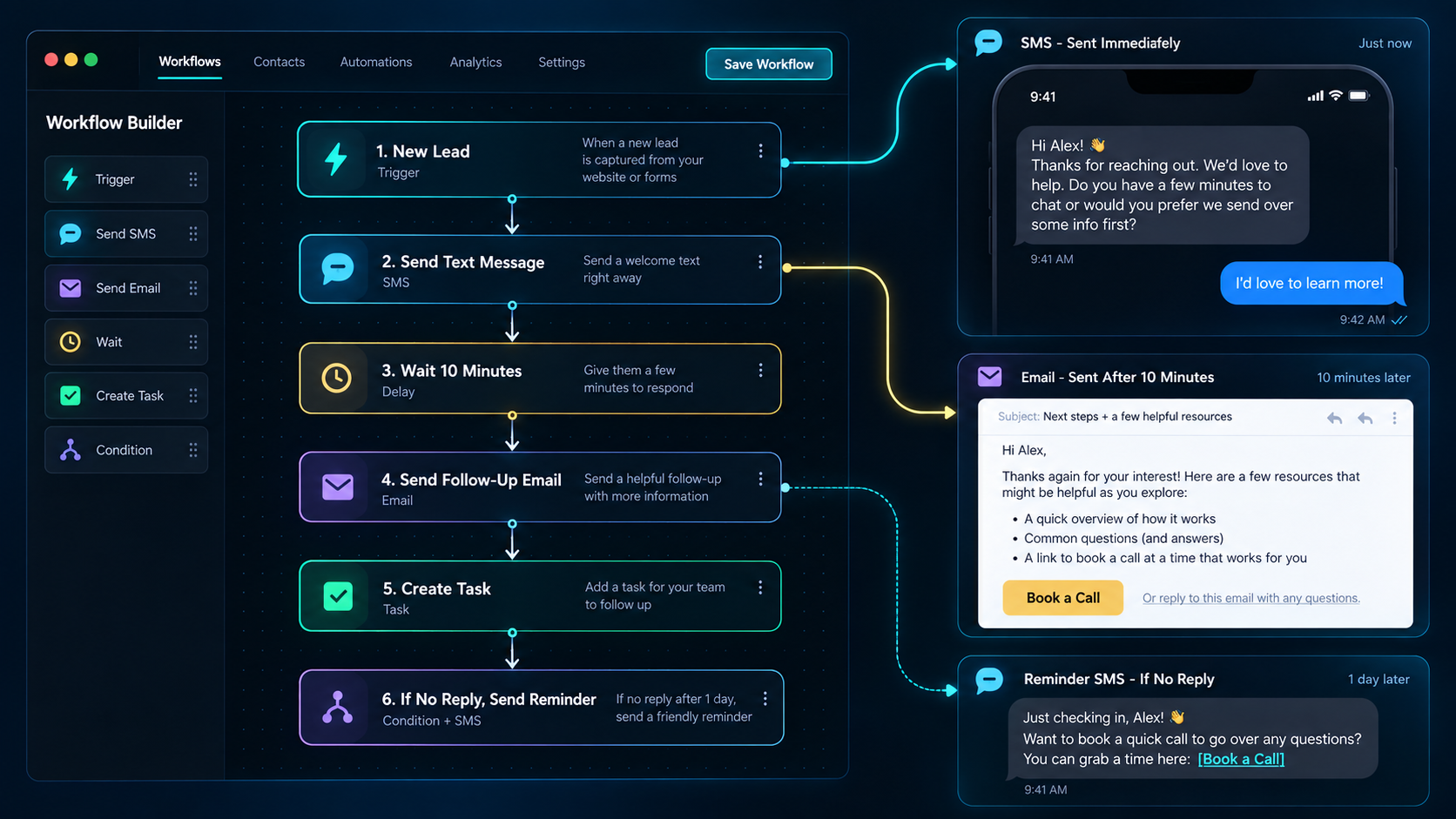
I Ninja LLC automated workflow setup showing a trigger and the approved messages it sends by Ian Lacovara

Workflows Are the Wiring Between Everything Else

On their own, each piece of your system does one job. Workflows are what make them act like one thing.

A call gets answered, which creates a contact, which triggers a text, which leads to a booking, which sends a confirmation, which schedules a reminder, which ends with a review request. Seven steps, one setup, zero people remembering. It all runs on the I Ninja App, where your calls, messages, calendar, and contacts already live together.

  • Triggered by real events
  • No double entry
  • Stops when it should
  • Runs at 3 a.m.

What This Looks Like in Different Businesses

Same idea, different triggers. A few examples of the first workflow each one usually builds.

Staffing & Recruiting

When an application arrives, send the screening questions, log the answers, and book an interview if they fit.

Property Management

When a maintenance request comes in, confirm receipt, route it to the right person, and update the tenant when it is scheduled.

MSPs & IT Services

When a client reports an issue, acknowledge it immediately, collect the details a tech will need, and confirm the visit.

Insurance Agencies

When a renewal date approaches, reach out ahead of time instead of after the client has already shopped around.

Agencies & Consultants

When a proposal has been out for a week with no answer, send the check-in nobody enjoys writing.

Local & Professional Services

When a job is marked complete, send the invoice and ask for a review before you have driven to the next address.

What Not to Automate

Automation is easy to overdo. Once it works, there is a temptation to run everything through it, and that is how businesses end up feeling like vending machines to their own customers.

Keep the human on anything that needs judgment, anything emotional, and anything where being wrong is expensive. Apologies should come from a person. So should bad news, unusual situations, and the conversation with your biggest client. We will tell you when we think something should stay manual, even though it would be easier to just build it.

AI is optional here

Workflows do not require AI. Everything described above can be built with rules and triggers you approve, doing exactly the same thing every time. I Ninja LLC is a human-first company, and AI is a layer you can turn on, turn off, or never switch on at all.

See exactly what is optional and what AI never does.

Workflow Questions, Answered

What people want to know before they let software do anything.

Does I Ninja LLC offer business automation?

Yes. I Ninja LLC builds automated workflows for service businesses. Common examples include replying to a new lead right away, sending a confirmation after someone books, sending reminders before an appointment, following up after a missed appointment, requesting a review after a job is finished, and restarting contact with leads who went quiet.

What is a workflow, in plain English?

A workflow is a rule that says: when this happens, do that. When a lead arrives, send a reply. When a job is marked complete, send the invoice. You decide the rule once, and it runs the same way every time without anyone needing to remember it.

Do I have to build the workflows myself?

No. I Ninja LLC builds them for you. We look at how your business already works, identify the steps that repeat, write the messages for your approval, and set everything up. You are not handed a blank builder to figure out on your own.

How many workflows should I start with?

One. We start with the single workflow that gives back the most time or stops the most obvious leak, get it running properly, and add others once it is working. Automating everything at once makes problems harder to spot.

Can I turn a workflow off or change it later?

Yes. Any workflow can be paused, edited, or removed. Timing, wording, and the conditions that trigger it can all be adjusted as your business changes.

Will customers be able to tell it is automated?

The messages are written in your voice and approved by you, so they read like your business rather than a system. What customers notice is that they hear back quickly and nothing gets forgotten.

What should not be automated?

Anything requiring judgment, anything emotional, and anything where being wrong is costly. Apologies, bad news, unusual situations, and important client conversations should come from a person. We will say so when we think a step should stay manual.

Does this need coding or technical skill?

No. There is no coding involved and nothing for you to configure. You describe how your business works, approve the messages, and the setup is handled for you.

Where is I Ninja LLC located?

I Ninja LLC is based in Trinity County, California and serves businesses across the United States. You can reach the company by email at [email protected] or through the contact page.

Next Step

Pick One Thing You Are Tired of Doing

Bring the task that annoys you most. Fifteen minutes is usually enough to tell you whether it can run itself.